- Bilingual transcript
- Built for Google Meet
Keep both languages of a Google Meet call, side by side
MeetVoice stores the line as it was spoken and the translation next to it, so the wording can still be checked weeks later by somebody who reads either language.
The trial gives you 30 minutes of live translation, no payment card required.
32 languages, any pair, chosen before you join.
The call this page was written for
Your localization team reviews copy with a Japanese partner every two weeks, and the arguments that matter are about wording. A translated-only record settles nothing, because the question is always what the original sentence actually said. MeetVoice keeps both versions of every line, so the next reviewer can see the Japanese and the English together instead of trusting one of them.
What this looks like during the call
Live transcript
ESENA record that keeps each captured line together with its translation.
El proyecto piloto duró dos semanas más, así que las cifras finales solo llegan el jueves.
The pilot project ran two weeks longer, so the final numbers only land on Thursday.
Entonces movamos la revisión al viernes por la mañana. Hoy aviso al cliente.
Then let's move the review to Friday morning. I'll let the client know today.
Me sirve. Mándame el borrador la noche anterior, con el desglose de costes.
Works for me. Send me the draft the evening before, with the cost breakdown.
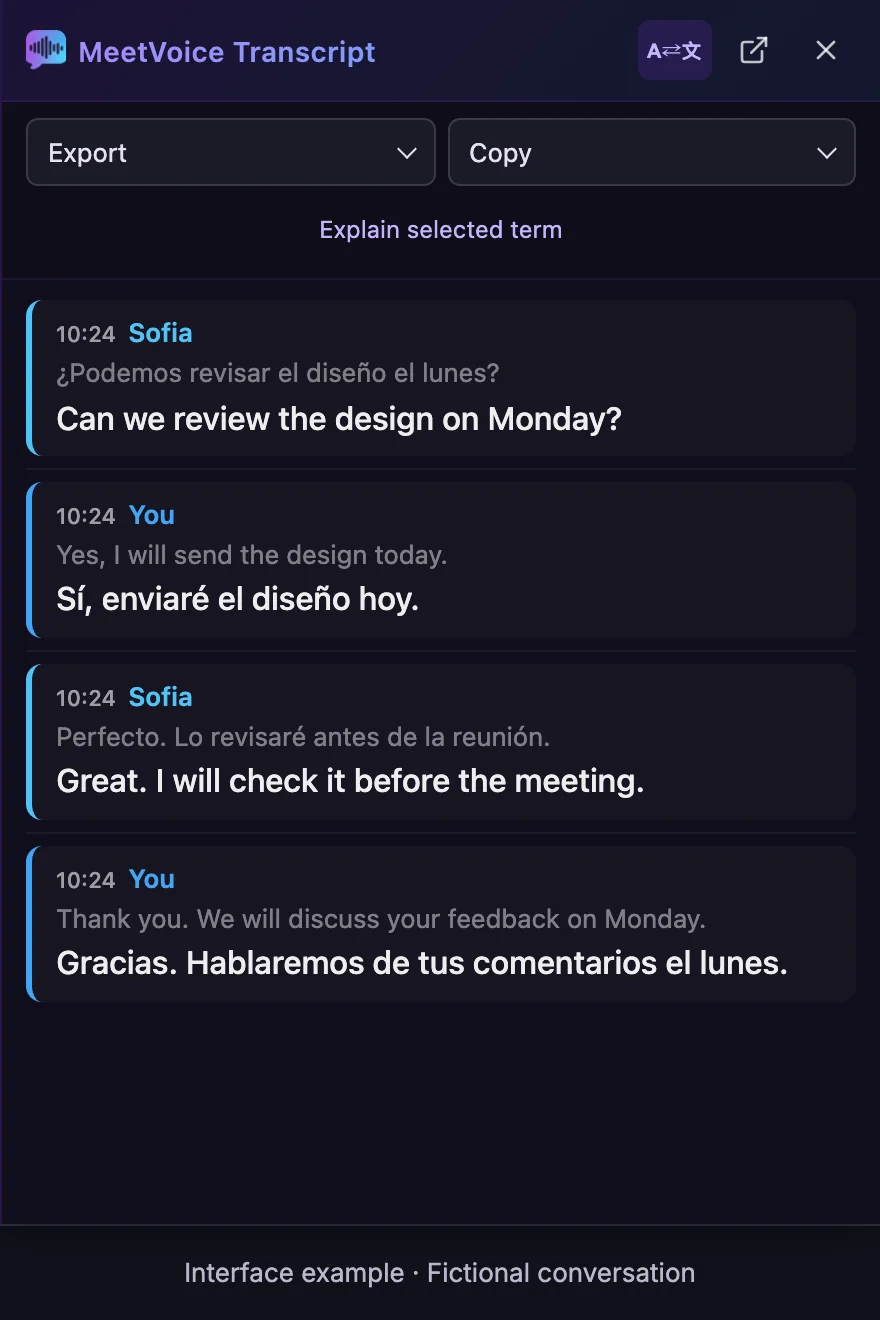
Read the full transcript instead
Sofia
What was said: ¿Podemos revisar el diseño el lunes?
Translation: Can we review the design on Monday?
You
What was said: Yes, I will send the design today.
Translation: Sí, enviaré el diseño hoy.
Sofia
What was said: Perfecto. Lo revisaré antes de la reunión.
Translation: Great. I will check it before the meeting.
You
What was said: Thank you. We will discuss your feedback on Monday.
Translation: Gracias. Hablaremos de tus comentarios el lunes.
How the three options compare
What Google Meet does on its own
Translated captions can be scrolled back during the meeting or embedded in a recording, but there is no paired original-and-translation document, and a Transcript has no translation. A Transcript is a file in Drive in the spoken language only. Translated captions can be embedded in a recording; there is no automatic bilingual PDF, SRT or TXT export.
Standard captions transcribe speech; translated captions display translated text on eligible plans. Both are text features. Speech Translation is a separate feature for translated audio. Google announced general availability of Speech Translation on February 4, 2026, and on October 22, 2026 expanded it to 63 languages: Meet detects the spoken language, and participants can translate between any combination of supported languages in the same meeting. It reached Rapid Release Workspace domains from October 22, and Scheduled Release domains get it from November 2, 2026, which can take up to 15 days. Each participant turns Speech Translation on for themselves; most eligible plans allow up to 90 minutes per meeting, Google AI Ultra up to 8 hours. Access depends on an eligible plan (in scheduled meetings, the host's), administrator settings, supported devices and participants allowing their voices to be translated. Speech Translation is not available in recordings or live streams. Where meeting recording is available, Record captions can include captions in the recording. Turning on captions alone does not automatically create a bilingual PDF, SRT or TXT export; availability and permissions depend on the plan and settings.
| What you are comparing | MeetVoice | Built-in Google Meet | Notetaker bot that joins the call |
|---|---|---|---|
| Is the original wording still there afterwards? | Yes — each saved line keeps the language it was spoken in, alongside its translation. | On eligible plans a Transcript keeps the spoken wording with no translation. Translated captions are temporary unless they are embedded in a recording. | Sometimes — many produce a record in one language and translate it as a separate step. |
| Can somebody check a translation later? | Yes — both versions of the line sit together under the same timestamp. | Translated captions can be scrolled back during the meeting or embedded in a recording, but there is no paired original-and-translation document, and a Transcript has no translation. | Only if the vendor keeps the source text as well as the translated one. |
| What formats does the record come in? | PDF with color coding, SRT for subtitle editors, and plain text. | A Transcript is a file in Drive in the spoken language only. Translated captions can be embedded in a recording; there is no automatic bilingual PDF, SRT or TXT export. | Vendor-specific, commonly a web page plus one download format. |
| Where is the record stored? | On your computer, in the extension's history, for the last 50 meetings. | A Transcript is saved in the organizer's Google Drive. Translated captions are stored only within the meeting recording, when they are embedded in it. | In the vendor's workspace, for as long as their retention policy says. |
| What happens with your own speech? | Not saved by default; it is added only when translation of your own speech is switched on. | A Transcript can include everyone's speech while transcription is on, in a supported language. | Can include your speech and the other participants' speech while the bot is recording. |
What the exported file looks like
Example export — generated by MeetVoice's exporter from the sample dialogue above
Meeting 2026-03-12 10:00
Date: 2026-03-12 10:00
Languages: ES → EN

[00:00:04] Speaker 1:
  El proyecto piloto duró dos semanas más, así que las cifras finales solo llegan el jueves.
  → The pilot project ran two weeks longer, so the final numbers only land on Thursday.

[00:00:12] Speaker 2:
  Entonces movamos la revisión al viernes por la mañana. Hoy aviso al cliente.
  → Then let's move the review to Friday morning. I'll let the client know today.

[00:00:19] Speaker 1:
  Me sirve. Mándame el borrador la noche anterior, con el desglose de costes.
  → Works for me. Send me the draft the evening before, with the cost breakdown.

Made with MeetVoice — https://meetvoice.app/?utm_source=transcript&utm_medium=export1
00:00:04,000 --> 00:00:12,000
Speaker 1: El proyecto piloto duró dos semanas más, así que las cifras finales solo llegan el jueves.
The pilot project ran two weeks longer, so the final numbers only land on Thursday.
2
00:00:12,000 --> 00:00:19,000
Speaker 2: Entonces movamos la revisión al viernes por la mañana. Hoy aviso al cliente.
Then let's move the review to Friday morning. I'll let the client know today.
3
00:00:19,000 --> 00:00:22,000
Speaker 1: Me sirve. Mándame el borrador la noche anterior, con el desglose de costes.
Works for me. Send me the draft the evening before, with the cost breakdown.
How to set it up
MeetVoice is a Chrome extension plus a companion desktop app. The extension reads the Google Meet tab you already have open and the desktop app coordinates the session from your machine, so no extra participant is added to the call.
Step 1 Install the extension and the companion app
Add MeetVoice from the Chrome Web Store and install the desktop app on Windows or macOS 13+ (Apple Silicon). The desktop app runs the session on your computer: speech is processed on servers as it is spoken and the audio is not kept, while the transcript is saved in the extension's history on your computer.
Step 2 Choose the spoken language and the translation language
Set the language people will speak and the language you want beside it. The panel colors each line by its speaker, so the record stays readable when several people talk in turn. In multilingual mode, a line can also carry a tag with the language it was recognized in.
Step 3 Export both languages at the end
Stop the session and export. The PDF keeps the color coding, the SRT carries the timings from the call, and the plain text version is the one to paste into a ticket. The last 50 meetings remain in history.
What usually goes wrong
- Captions alone do not give you a reusable bilingual document; check the recording and export options before relying on them.
- A translated-only record cannot be audited, because the sentence it was translated from is gone.
- Two separate files, one per language, drift apart the moment anybody edits either of them.
Why this holds up in a real call
- The spoken line is never overwritten — the translation is stored next to it, not instead of it.
- The spoken line is preserved with its own speaker label and timestamp, and the translation is attached to it rather than swapped in.
- Both languages travel together in the export, so the SRT for a subtitle editor and the PDF for the client come from one source.
Questions people ask before installing
Does keeping both languages slow the call down?
No. The spoken line and its translation are written as they are produced, so keeping both is a storage decision rather than an extra processing step you have to wait for.
Can I use the export in a subtitle editor?
Yes. The SRT export carries the timings from the call, which is what a subtitle editor needs. The PDF is the version to send to a client, and plain text is the version to paste into a ticket.
What happens when several people speak different languages?
Multilingual mode handles up to four participant languages in one call and listens to incoming speech only; it uses your plan's included hours like any other session. Lines are grouped by the speaker MeetVoice heard. When the language is identified, a line can also carry a tag with that language, so the record stays readable instead of becoming one undifferentiated block.
Is any of this uploaded and kept?
Audio is processed in transit and is not stored on our side. The bilingual record itself lives in your extension's history on your own machine, and removing the extension removes that local history too.
How is this different from translated captions?
Translated captions are for reading during the meeting: you can scroll back through them and include them in a recording, but they do not give you a separate file in both languages to export. MeetVoice gives you that file, as PDF, SRT or plain text.
How do I check a translation later?
Find the reply by its time or its speaker, then compare the original and the translation in the PDF or the plain-text file, where they sit one under the other. The SRT file is for a subtitle editor, where the cues show both versions.
Can multilingual mode recognize my language?
Yes, multilingual mode recognizes speech in English. It recognizes speech in only some of the supported languages, while translation can go into any supported language. In the usual mode, any two different supported languages work as a pair.
Can I export only one of the two languages?
PDF, SRT and plain-text exports include both versions; there is no one-language option. The switch for the bilingual view changes what the panel shows and what the Markdown and Notion exports contain.
Keep the original wording and the translation side by side, so a sentence can still be checked later.
The trial gives you 30 minutes of live translation, no payment card required.
Page last reviewed